USER MANUAL · TJ1GD REMOTE X6100
CW
CW decoder with automatic signal finding, and keyboard sending with macros. Plus why the radio switches to U-DIG while transmitting.
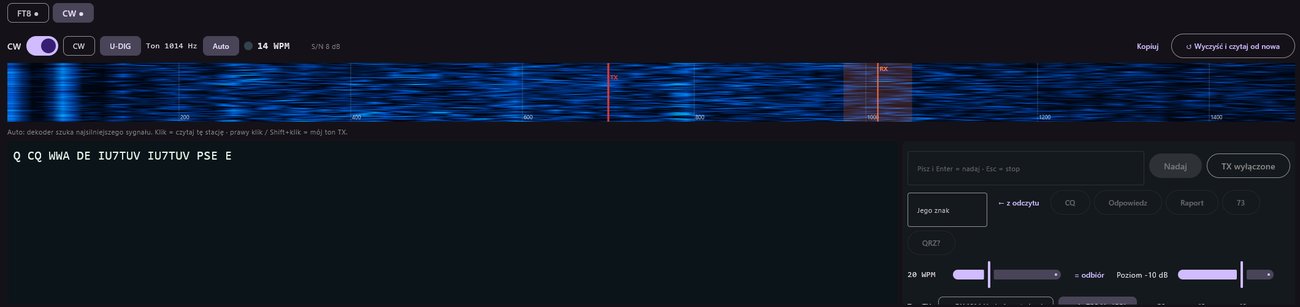
Receiving and the decoder
- In the CW tab switch CW on.
- Choose the radio mode: CW (the radio's narrow filter, best reception) or U-DIG.
- Pick a station: click (tap) its trace on the audio waterfall (0–1500 Hz). The orange band shows what the decoder reads.
- Ton … Hz – tone of the station being read (250–1400 Hz, default 600).
- Auto – the decoder looks for the strongest signal; it only jumps to a clearly stronger one (by more than 6 dB).
- Lamp – flashes with every dot and dash received.
- WPM and S/N – speed and signal-to-noise (speed shown from 7 dB S/N).
- Kopiuj – copies the text; ↺ Wyczyść i czytaj od nowa – clear and relearn the speed.
Sending from the keyboard
First: Zezwól na nadawanie in the transmit section, and your call in the FT8 panel (Mój znak, used as {MY}).
- Type in Pisz i Enter = nadaj · Esc = stop and press Enter (or Nadaj). You can keep typing while sending – text is queued.
- Set the speed with the WPM slider (10–40) – = odbiór takes the speed of the station you're reading.
- Esc or the “● NADAJE – Stop” button stops at once.
Macros
| Button | Text |
|---|---|
| CQ | CQ CQ CQ DE {MY} {MY} {MY} K |
| Odpowiedz (reply) | {DX} DE {MY} {MY} K |
| Raport (report) | {DX} DE {MY} TNX UR 599 599 BK |
| 73 | {DX} DE {MY} TU 73 <SK> |
| QRZ? | QRZ? DE {MY} K |
{DX} is the Jego znak (his call) field; ← z odczytu fills it with the last call the decoder read. After CQ and QRZ? the decoder moves to your own tone to read the replies.
Transmit tone
- = RX … Hz (odpowiadam) – you transmit exactly on the station you read (zero-beat). Default.
- stały … Hz (CQ) – a fixed tone, e.g. a clear spot to call CQ. Change it with −50/−10/+10/+50 or by right-clicking (Shift+click; long press on the phone) the waterfall.
- słuchaj na TX – sets reception to your transmit tone.
- Poziom – transmit level (−30…0 dB); set it so ALC barely moves.
Why U-DIG when transmitting and CW when receiving?
The app sends CW as a keyed audio tone streamed to the radio over the network – like FT8. The radio's CW mode does not take external audio (it transmits only from a key plugged into the radio), so transmitting needs the digital mode U-DIG. Receiving, on the other hand, is better in CW mode with the radio's narrow CW filters.
So when the radio is in CW mode, for each over the app:
- remembers the mode and frequency,
- switches the radio to U-DIG and shifts the dial so the tone lands on exactly the same frequency on the air,
- waits for the radio to confirm (up to 3 s) and only then transmits,
- after transmitting, returns to CW on the original frequency.
If the radio does not confirm the switch, the app does not transmit and restores CW. In U-DIG nothing is switched.
How the frequency is calculated
In CW mode the radio hears a carrier at dial frequency F as a tone equal to the radio's CW pitch P. In U-DIG a tone t goes on the air at dial + t. So that the sent tone lands in the same place, the app sets the U-DIG dial to F − P.
Problems
| Message | What to do |
|---|---|
| “Włącz „Zezwól na nadawanie” w sekcji TX.” | Turn on allow-transmit in the transmit section. |
| “Wpisz swój znak w panelu FT8…” | Fill in Mój znak in the FT8 panel. |
| “TX: radio już nadaje (FT8?)” (radio already transmitting) | Stop FT8 – CW and FT8 never transmit together. |
| “TX: radio nie przeszło na nadawanie” | The radio did not confirm U-DIG or TX – check it and try again. |
| Decoder shows “— WPM” | Signal too weak (S/N below 7 dB) – pick another station or a narrower filter. |