USER MANUAL · TJ1GD REMOTE X6100
FT8, PSK Reporter and QRZ.com
Built-in FT8 receiver and transmitter – no WSJT-X, no audio cables. Automatic QSO sequencing, ADIF log, PSK Reporter spots and upload to QRZ.com.
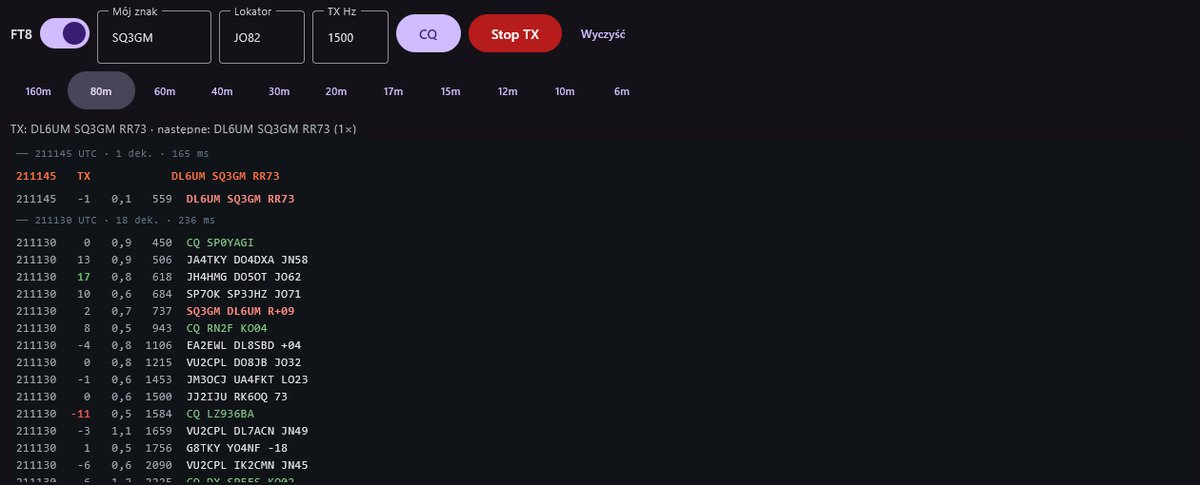
Before first use
- Clock. FT8 needs accurate time (±1 s). Windows: Settings → Time & language → Date & time → Sync now. Phones set the time themselves.
- Mój znak (my call) and Lokator (4 characters, e.g.
JO82) – without them transmitting is blocked. The app remembers them. - Radio in U-DIG with a wide filter (≥ 3 kHz). The band buttons do this for you.
Receiving
- In the FT8 tab (phone) or FT8 panel (PC) switch FT8 on.
- Click a band, e.g. 20m – the radio goes to 14.074 MHz in U-DIG.
- At the end of each 15-second slot the decodes appear: UTC time, SNR, DT, audio frequency and text.
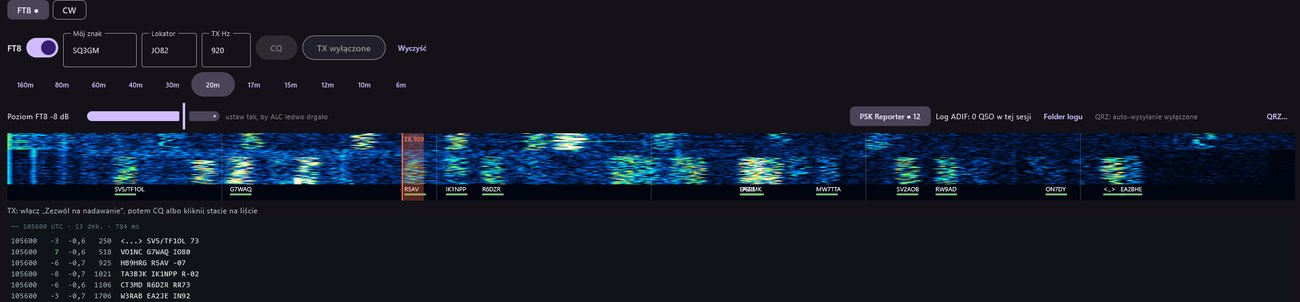
The slot header shows the number of decodes or the warning “brak dźwięku z radia” (no audio from the radio). On the audio waterfall (0–3000 Hz) stations from the last slot are marked green; the orange “TX” line is your transmit frequency.
Band frequencies: 160m 1.840 · 80m 3.573 · 60m 5.357 · 40m 7.074 · 30m 10.136 · 20m 14.074 · 17m 18.100 · 15m 21.074 · 12m 24.915 · 10m 28.074 · 6m 50.313 MHz.
Before transmitting
- In Nadawanie (transmit) turn on Zezwól na nadawanie (off after every start).
- Set the Poziom FT8 (FT8 level) slider so that ALC barely moves. If too high, the app shows in red “za dużo, zmniejsz” (too much, reduce).
- The TX source choice (Mikrofon radia / Wejście komputera) doesn't matter – FT8 switches to app audio for each over and restores your setting afterwards.
Answering a station
Click the decode line of the station you want to work. The app:
- transmits in the slots opposite to the station's,
- sets your TX frequency to that station's frequency,
- sends the call with a report (the SNR you hear it with) and runs the QSO by itself.
You can also set the TX frequency by clicking the audio waterfall or in the TX Hz field (200–2900 Hz).
Calling CQ
Click CQ. It turns green “CQ ●” and the status line shows your slots (“parzystych (:00/:30)” even or “nieparzystych (:15/:45)” odd). When someone answers, the app runs the QSO.
QSO sequence (automatic)
| Stage | Example |
|---|---|
| CQ | CQ SQ3GM JO82 |
| Tx1 – call | DL6UM SQ3GM JO82 |
| Tx2 – report | DL6UM SQ3GM -12 |
| Tx3 – R + report | DL6UM SQ3GM R-12 |
| Tx4 – RR73 | DL6UM SQ3GM RR73 |
| Tx5 – 73 | DL6UM SQ3GM 73 |
- Only messages addressed to you from the station you're working move the sequence on.
- Without an answer transmitting stops after 6 repeats (CQ after 20).
- The QSO is logged after sending “73” or “RR73” twice, or after receiving “73” from the other station.
Transmit button: grey TX wyłączone (TX off), dark red “● TX włączone – Stop” (waiting for the slot), red “● NADAJE – Stop” (transmitting). A click stops at once. Wyczyść clears the decode list.
ADIF log
Every QSO is appended to ft8_log.adi:
- Windows: the
X6100Remotefolder in your user folder – Folder logu opens it. - Android: the path is shown in the Ustawienia (settings) tab (“Log FT8 (ft8_log.adi): …”); reachable from a PC over USB.
The file holds call, locator, reports, time, band and frequency. Import it into QRZ.com, eQSL, ClubLog and LoTW (via TQSL).
PSK Reporter
The PSK Reporter chip (on by default) reports every station you hear to pskreporter.info – just like WSJT-X. The counter shows the number of spots sent. Needs your call and locator. First reports go out after 1–2 minutes, then about every 5 minutes. Enter your call on the map to see your reception.
Automatic logging to QRZ.com
Getting the API key
- Sign in at qrz.com and open Logbook.
- Open the logbook Settings and copy the API Access Key (looks like
ABCD-1234-EF56-7890).
In the app
- In the FT8 panel click QRZ… – the “Logbook QRZ.com” window opens.
- Paste the key into Klucz API.
- Click Sprawdź klucz (check key). A valid key shows “QRZ: klucz OK · logbook YOURCALL · n QSO”.
- Turn on Wysyłaj każde QSO FT8 automatycznie (upload every FT8 QSO automatically).
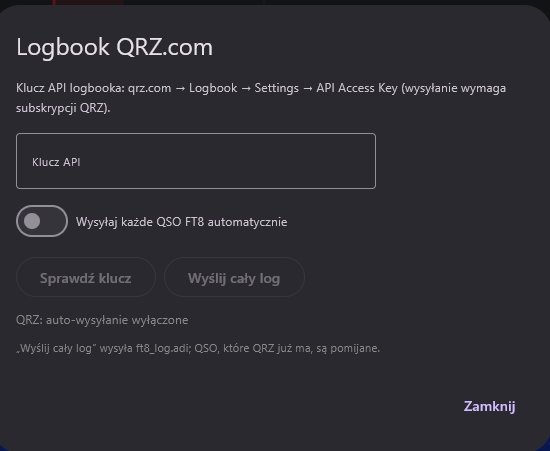
From now on every completed QSO is uploaded in the background. Without internet or with a bad key, QSOs wait in a queue and are sent later (Ponów (n) – retry, and automatically at the next start).
- Wyślij cały log (send whole log) – uploads the whole
ft8_log.adi; QSOs QRZ already has are skipped. Use it the first time or after working with auto-upload off. - QSOs rejected by QRZ go to
qrz_rejected.adiwith the reason. - The “QRZ: …” line shows the state, e.g. “QRZ: wysłano 3 · już w QRZ 1 · czeka 0” (sent 3 · already in QRZ 1 · waiting 0).
Problems
| Symptom | Cause / what to do |
|---|---|
| “brak dźwięku z radia” (no audio) | Check the connection (audio ACTIVE). On Windows – firewall, see Firewall. |
| Signals visible but “brak dekodów” (no decodes) | Sync the clock. Check U-DIG and a filter ≥ 3 kHz (FIL1). |
| CQ button inactive | Turn on FT8 and “Zezwól na nadawanie”; enter call and 4-character locator. |
| “TX: radio nie przeszło na nadawanie” (radio did not go to TX) | The radio did not confirm TX within 1.2 s – check the radio (TX lock, other mode). |
| “QRZ: zły klucz” (bad key) | Copy the key again from Logbook → Settings. |